
The Spice manifest (spice.json)
A Thumper mod is a folder under <game>\Mods\<id>\ with a spice.json at its root. The machine-readable
schema is spice-1.schema.json; this page explains the fields and how Thumper uses
them. A folder with no spice.json still loads as an implicit, client-only, dependency-free mod named
after its folder — every M1-era Mods\ folder keeps working unchanged.
Field reference: every spice.json field with its type, default and allowed values is in the spice.json schema reference.
Minimal example
Section titled “Minimal example”{ "spiceVersion": 1, "id": "hello-spice", "version": "1.0.0", "name": "Hello Spice", "melange": { "range": ">=0.3.0 <0.4.0" }, "kind": "client-only", "entry": { "client": "client/init.lua" }}Fields
Section titled “Fields”| Field | Notes |
|---|---|
spiceVersion |
Must be 1. A manifest with a schema version Thumper doesn’t know is incompatible and never gets a load-order slot. |
id |
Lowercase, [a-z0-9_-], 1-64 characters. Must equal the folder name — one id, one folder. Used as the dependency-graph key and the wum.storage/wum.config namespace. |
version |
Semver MAJOR.MINOR.PATCH[-prerelease][+build]. |
name, authors, description, website |
Display only. |
melange.range |
An npm/Cargo-style semver range (^1.2.0, >=0.5.0 <0.7.0, space = AND) the running Melange version must satisfy, or the mod is incompatible (and the compatibility sweep moves it out of Mods\). |
kind |
client-only (never touches the simulation, the wire, or Data/Tweak/*; no online handshake) or content (does at least one of those). entry.sim, messages, or permissions.unsafe: true all imply the mod counts as content for the online handshake even if kind says otherwise. |
dependencies, optional, conflicts |
Arrays of "<id>" or "<id> <comparator><version>" (e.g. "weapon-toolkit >= 2.0.0 <3.0.0"). dependencies are required and order the graph; optional orders the graph only when the id is present and version-compatible; conflicts blocks both mods, whichever side declares it. |
loadAfter |
Plain mod ids: an ordering-only edge with no existence requirement — nothing breaks if the named mod isn’t installed. |
permissions.unsafe |
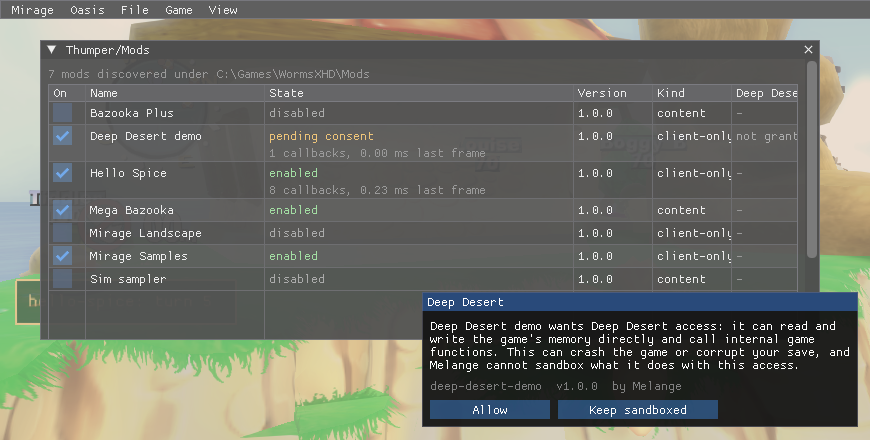
Deep Desert: wum.unsafe.* (raw memory read/write, calling game functions), client VM only. Enabling such a mod opens a consent modal in the overlay; declining still loads the mod, with wum.unsafe calls raising instead of working. |
permissions.filesystem |
none (default), own-folder (read) or own-folder-write, for Melange-mediated file helpers. Never raw Lua io. |
permissions.network |
Reserved for a later milestone. Accepted and ignored (with a log warning) by this build. |
entry.client |
Path, relative to the mod folder, loaded into the always-on Sandbox VM (Lua 5.4). |
entry.sim |
Path registered into the match’s Lua VM at match start (Lua 5.0 dialect, float numbers). Requires kind: "content". |
assets.root / .shaders / .effects |
Data-override folders, as M1’s Mods\<id>\ already used (defaults assets, shaders, effects). |
contentHash.include |
Glob list of files that feed the online content hash (default: entry.sim, assets/**, *.spice.json). Never computed for a client-only mod. |
messages |
Up to 16 engine message names this content mod registers (pattern Prefix.Sub[.Sub...], 1-5 dotted segments after the first capitalised word). Checked against the live vanilla message registry at start-up, not a fixed list in the schema — a name that collides with a vanilla one is skipped and logged, not a hard error for the rest of the mod. The engine has 73 free slots; Thumper caps registrations at [Thumper] MaxModMessages (48) across every mod combined. |
settings |
{key, type: bool|int|float|string|enum, default, min?, max?, options?, label}. Drives wum.config.get/set and the per-mod widgets on the Mods page. |
weapons |
Weapon clones, kind: "content" mods only — see below and weapons.md. |
weaponText |
New panel names and help text for vanilla weapons, kind: "content" mods only — see weaponText. |
weaponIcons |
New panel and HUD icons for vanilla weapons, kind: "content" mods only — see weaponIcons. |
schemes, factoryWeapons |
Game styles and custom-weapon presets from data files, allowed for client-only mods; see schemes and factoryWeapons. |
music |
MP3 tracks for the sudden-death music, allowed for client-only mods; see music. |
meshes |
Mesh banks (.xom) under the assets root that give a weapon clone or a wum.sim.weapon():set its own 3D model, kind: "content" mods only — see meshes. |
vehicleMeshes |
The mesh the Airstrike and Super Airstrike helicopters are drawn with, kind: "content" mods with a meshes bank only — see vehicleMeshes. |
defaultEnabled |
Honoured only the first time Thumper ever sees this mod id (default true). The shipped samples set it to false. |
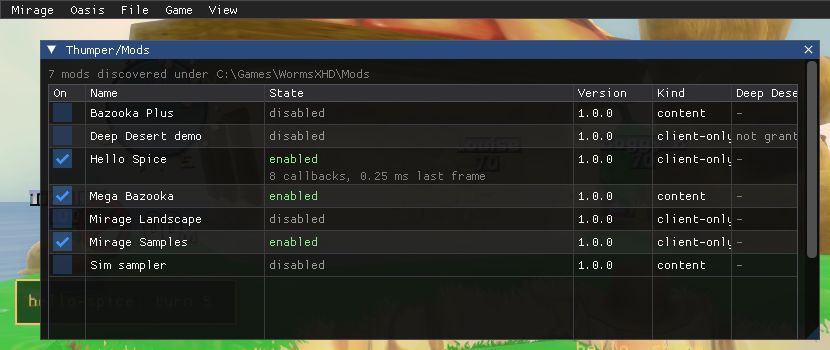
Before: unsafe mod switched on |
After: the consent modal |
|---|---|
 |
 |
weapons: weapon clones
Section titled “weapons: weapon clones”A kind: "content" mod can declare up to 3 weapon clones (schema: spice-1.schema.json),
in the free panel cells 29, 39 and 40 — shared across every enabled mod, not per mod. This is checked in two
passes, both at every Thumper rescan:
- Shape, right here in
spice.cpp: at most 3 entries, each an object with a known set of keys (name,base,cell,bank,set,panelIcon,hudIcon,text),setvalues that are a number, a boolean or a string. A shape error refuses the whole mod, naming the bad key or value. - Names, bases, cells and field types, in
weapons/manifest.cpp— the base whitelist, the resource-name pattern, cell conflicts between mods (later load order loses), and eachsetfield checked against the base’s own container schema. A mod that fails here isIncompatiblewith the specific reason.
The full field reference, the base whitelist, the Lua side (wum.sim.weapons) and what does and doesn’t work
yet are in weapons.md; dist\Mods\mega-bazooka is a complete, working (disabled) example.
weaponText: renaming vanilla weapons
Section titled “weaponText: renaming vanilla weapons”A kind: "content" mod can give vanilla weapons new panel names and help text without changing how they behave:
"weaponText": { "kWeaponBazooka": { "name": "Nail Bat", "help": "Swing it at the nearest worm." }, "kUtilityJetPack": { "name": "Rocket Pack" }}The key is the weapon’s container name, ^k(Weapon|Utility)[A-Z][A-Za-z0-9]{2,40}$. name is 1-24 and help 0-160
printable ASCII characters (no control characters); at least one of the two is needed, and an unknown field inside an entry
refuses the mod. At most 64 entries per mod. Checked in two passes, like weapons:
- Shape, in
spice.cpp: the kind, the count, the key pattern, the text limits, and that the key is not a clone declared in the same mod’sweapons(a clone has its owntext). - Across mods, in
weapons/manifest.cpp: a key may not be a clone name declared by any mod, and a weapon renamed by an earlier mod in load order refuses the later mod as a whole (the reason names the weapon and the earlier mod).
Whether each container exists is checked when a match starts; an entry for a weapon the game doesn’t have is skipped with a warning. How it works, what it needs online and what is unverified in game are in weapons.md.
weaponIcons: replacing vanilla weapon icons
Section titled “weaponIcons: replacing vanilla weapon icons”A kind: "content" mod can replace the weapons-panel icon and the HUD icon of vanilla weapons, the way a clone gets its
own with panelIcon and hudIcon:
"weaponIcons": { "kWeaponBazooka": { "panelIcon": "icons/ripper.png", "hudIcon": "kindjal.ripper.hud.tga" }, "kWeaponGrenade": { "panelIcon": "icons/pineapple.png" }}The key is the weapon’s container name, as for weaponText (^k(Weapon|Utility)[A-Z][A-Za-z0-9]{2,40}$, a vanilla weapon,
never a clone name). At least one of panelIcon and hudIcon is needed per entry, an unknown field refuses the mod, and
there are at most 64 entries per mod.
| Field | Notes |
|---|---|
panelIcon |
A PNG path under the assets root (relative, no .., no drive), square, a multiple of 64 pixels up to 4096; larger images are box-filtered to 64x64. Written over the weapon’s own 64x64 slot in the panel’s icon sheet. |
hudIcon |
A file name (no folder) under assets/loose/, ending .tga and named <modId>.*, so it can never shadow a vanilla file. It is loaded in place of the weapon’s vanilla Data\HUD\Weapons\*.tga. |
Checked in two passes, like weaponText: the shape and file-name rules (and that the key is not a clone of the same mod)
in spice.cpp and weapons/manifest.cpp, then across mods in load order. A key may not be a clone name declared by any
mod, and a weapon that an earlier mod already has icons for refuses the later mod as a whole (the reason names the weapon
and the earlier mod). A weapon can have weaponText from one mod and weaponIcons from another. The rules are part of
the content identity, so peers with different icons do not play together. How the replacement is applied, when the vanilla
icons come back, and what is unverified in game are in weapons.md.
levels: map packs
Section titled “levels: map packs”A kind: "content" mod can ship maps built with Erg, up to 32 per mod and 128 across every enabled mod:
"levels": [{ "slug": "harbour", "title": "Harbour Brawl", "type": "multi", "chunk": true, "source": "src/harbour.ergpatch.json" }]| Field | Notes |
|---|---|
slug |
[a-z0-9]{1,24}, unique within the mod. The level’s file stem is <prefix>_<slug>, where <prefix> is the mod id with - turned into _. |
title |
Printable ASCII, 1-40 characters. What players see in the Prebuilt list. |
type |
multi only — other map types aren’t supported yet. |
chunk |
true when the pack ships a generated script (assets/levels/<stem>.lub) for spawns, placed objects or a water level. |
source |
Path to the patch the map was built from (Erg writes this). When the built files are missing, the mod is Incompatible with “not built: open Erg and press Build, or run build.ps1”. |
sim |
Optional sim/<name>.lua: the map’s level script, run in the sim sandbox only on this map. At most 256 KB of UTF-8 without a byte order mark. |
survivor |
Optional, default false: also list the map in Survivor’s Prebuilt section as Multi.<stem>.S, on the same files (see Survivor copies). Earlier Melange versions refuse it. |
Two mods that resolve to the same prefix (their ids differ only by -/_) can’t both ship maps; the later one in
load order is Incompatible. A map’s own files never touch anything under Data\, are never named the same as one
of the game’s own map files, and never include the shadow-cache files (.csh) the game itself generates.
schemes and factoryWeapons: game styles and weapon presets
Section titled “schemes and factoryWeapons: game styles and weapon presets”Data only, so both are allowed for a kind: "client-only" mod (a content mod may use them too). Each is an array of
{ "file": "<path>.json" }; the path is relative to the mod folder, must stay inside it and end in .json.
"schemes": [{ "file": "schemes/kanly.json" }],"factoryWeapons": [{ "file": "weapons/red.json" }]At most 8 schemes and 16 factory weapons per mod, and 32 and 64 across every enabled mod. A key used twice (by any
mod, or by one of the game’s own entries) is refused with an error in the log ([schemes] <mod>/<file>: ...) and that
entry is skipped; the rest of the mod still loads. A shape error in the manifest itself refuses the whole mod, as
for levels.
Scheme file: one game style, listed in Versus > Deathmatch > Game Style (and the same list in the other local modes) as a permanent built-in style: the game neither edits nor deletes it, and the list is sorted alphabetically by display text. The scheme is a copy of a built-in one with your changes.
{ "key": "FETXT.Scheme.Kanly", "title": "Kanly", "base": "FE.Scheme.Standard", "lock": "Lock.Scheme.Standard", "fields": { "RoundTime": 300000, "SuddenDeath": 1, "WaterSpeed": 3 }, "weapons": { "*": { "Ammo": 10, "Delay": 0 }, "ConcreteDonkey": { "Ammo": 1 }, "HealthMystery": { "Crate": 50 } }}| Field | Notes |
|---|---|
key |
FETXT.Scheme.<Name>, the name being 2-32 letters or digits starting with a letter. It is the scheme’s Name and the name of its display string. |
title |
The text shown in the list, 1-24 printable ASCII characters. |
base |
The Name key of a built-in scheme to copy (default FE.Scheme.Standard; others include FE.Scheme.Pro, FE.Scheme.Beginner, FETXT.Scheme.Darksider). |
lock |
Optional lock key (default: the base’s, Lock.Scheme.Standard for Standard, which is unlocked from the start). Lock.AllwaysLocked hides the scheme. |
fields |
Any integer or boolean field of the game’s SchemeData by name, e.g. Wins, WormHealth, RoundTime and TurnTime (milliseconds), SuddenDeath (0 is 1 Health, 1 is Raise Water, 2 is Draw Round), WaterSpeed (1 Slow, 2 Medium, 3 Fast), WindMaxStrength, MineFactoryOn. Integers must fit in int32. Permanent is always true. |
weapons |
Per-weapon Ammo, Crate and Delay, keyed by the SchemeData field name of the weapon (Bazooka, ConcreteDonkey, …, and the 15 ...Mystery entries). "*" applies to all 58 entries first, then each named entry on top. |
An unknown field or weapon name, a value that is not an integer or is outside int32, or an unknown key is an error and the scheme is skipped.
Factory weapon file: one custom-weapon preset, listed in the team editor’s weapon list. A team stores only the preset’s key.
{ "key": "FETXT.Kanly.Red", "title": "Red Kanly", "base": "FETXT.WipeOut", "stock": true, "weapon": { "WormDamageMagnitude": 1.2, "FuseTime": 1500, "DetonationFX": "WXP_ExplosionX_Med" }, "cluster": { "WormDamageMagnitude": 0.6 }}| Field | Notes |
|---|---|
key |
FETXT.<Name>[.<Name>...], 6-40 characters, each part letters and digits starting with a letter; not a built-in key. The preset’s Weapon container’s Name is set to it, and it is the display string’s name. |
title |
The text shown, 1-24 printable ASCII characters. |
base |
Required: the key of a built-in preset to copy (weapon and cluster): FETXT.AFewProblems, FETXT.ChatterBomb, FETXT.KneeTrembler, FETXT.ThePeaceBreaker, FETXT.TheBrownSofa, FETXT.Factory.Blaster or FETXT.WipeOut. |
stock |
StockWeapon, default true. |
weapon, cluster |
Overrides on the two WeaponFactoryContainers by field name: booleans, integers (int32; U32 fields 0 to 4294967295), enums as integers (0-255), floats, strings (printable ASCII) and the string arrays GraphicalResourceID and GraphicalLocatorID. Name cannot be overridden. |
Melange rebuilds the game’s DATA.LockedSchemes and DATA.LockedWeapons resources from its own Data\Tweak\LOCAL.XOM
with the entries of every enabled mod appended, writes them to Melange\cache\schemes\, and loads them over the
originals at the frontend (again whenever the set of enabled mods changes while you are at the menus; a disabled
mod’s entries leave the lists without a restart, expected but not yet verified in game). With no enabled mod declaring either key, nothing is touched.
[Schemes] Enabled=0 in Melange.ini turns it off.
Both lists are client-side. The lobby names the host’s game style by its position in the host’s list
(scheme_code), not by key, so a peer without the mod has no entry for it: the unmodified game reads past the end of
its own list and crashes on joining. With [Fixes] SchemeCode=1 (the default) such a peer sees the style as
“Unknown game style” instead. Whether the match itself then plays with the host’s settings is not verified. That a preset is listed in the team editor is expected to work like the scheme list but has not
been verified in game.
music: sudden-death music
Section titled “music: sudden-death music”Replaces the music that plays when sudden death starts with MP3s from the mod. Allowed for a kind: "client-only"
mod (a content mod may use it too): the music is local, and every player hears their own.
"music": [ { "slot": "suddenDeath", "file": "music/ash-ridge.mp3", "title": "Ash Ridge", "credit": "Slaughter at Ash Ridge" }]| Key | Meaning |
|---|---|
slot |
Required. Only "suddenDeath" for now; another value refuses the mod. |
file |
Required. A .mp3 path relative to the mod folder, inside it, at most 24 MiB. |
title |
Required. 1-48 printable ASCII characters, shown in the log. |
credit |
Optional, at most 96 characters: the original title or author, shown in the log only. |
At most 16 entries per mod and 64 tracks per slot across every enabled mod. The audio must be MPEG-1 or MPEG-2 Layer II
or III (a normal MP3; ID3 tags are skipped), with at least 50 frames, and one sample rate and channel count throughout
the file. All tracks of a slot must share one sample rate and channel count (Melange does not resample): the first
track in load order sets them and a track that differs is skipped with an error in the log ([music] <mod>/<file>: ...).
A shape error in the manifest itself refuses the whole mod. Only add music you hold the rights to; Melange does not
check, and the plugin author is responsible for what a plugin ships.
Every enabled mod’s tracks for the slot are played back to back in a random order, with hard cuts. The order is new for
every match, and the track that led last time does not lead again when there are two or more tracks. With no enabled
mod declaring music the game’s own music plays. The game’s own muSuddenDeath.fsb is never modified, and the
sudden-death sting and commentary are untouched. [Music] Enabled=0 in Melange.ini turns it off.
meshes: custom 3D models
Section titled “meshes: custom 3D models”Loads mesh banks so a weapon can use a model of the mod’s own. kind: "content" mods only.
"meshes": [ { "file": "assets/meshes/kindjal.NailBat.xom" }]| Key | Meaning |
|---|---|
file |
Required, the only key. A .xom path relative to the mod folder, inside it, under the mod’s assets root (assets/ unless assets.root renames it). At most 64 entries per mod, none twice. |
A bank is an xomtool convert <mesh.gltf> --bundle <out.xom> --as <modId>.<Name> file (see xomtool.md).
Every resource name in a bank must start with <modId>. (the mod’s own id and a dot), so two mods cannot collide and a
mod cannot replace a vanilla mesh. Once the bank is loaded, name the mesh from a clone’s set or an entry.sim:
wum.sim.weapon("kWeaponBaseballBat"):set("WeaponGraphicsResourceID", "kindjal.NailBat")Because the files sit under the assets root they are already part of the content hash: peers must have the same banks,
like any other file under assets/**. The mod does not need to re-hash anything by hand.
When the banks load: once per launch, on the main thread, after the game has been at the main menu for about half a
second (the same settle the schemes and music features wait for), for every content mod that is active this session,
in load order. A bank that cannot be loaded (unreadable, not a mesh bank, a name outside <modId>., a name the game
already has, …) is logged as [meshes] <mod>/<file>: <reason> and skipped; the mod stays enabled and its other banks
still load. One summary line per launch reports the banks, meshes and sections used. Content-mod changes need a restart
anyway, so a mod disabled later keeps its banks for the rest of the session.
Each bank takes one of the engine’s free section numbers (476 to 519). A bank keeps the section it was built with
(--section) when that section is in range and still free; otherwise Melange rewrites the section in a copy under
Melange\cache\meshes\ and loads that, taking the first free section from 476 up, in load order. At most 44 banks load
in one session across all mods, however many each mod declares (up to 64): the banks past the budget in load order are
skipped, and the log says so before the first load (only 44 of the 44 mod sections are free: the last N in load order will not load) and for each skipped bank. Put several variants of a model in one bank rather than one bank each if a pack needs
many meshes. The engine, the section table and the mechanics are in meshes.md.
vehicleMeshes: the Airstrike helicopters
Section titled “vehicleMeshes: the Airstrike helicopters”Replaces the model of the aircraft the Airstrike and Super Airstrike send over. The aircraft is not a weapon field, so
set cannot reach it: the engine’s two graphic entities each have a built-in mesh name, and this swaps that name for a
match. kind: "content" mods only, and the mod must list at least one meshes bank.
"meshes": [{ "file": "assets/meshes/kindjal.Chopper.xom" }],"vehicleMeshes": { "BomberHelicopter": "kindjal.Chopper", "SuperAirstrike": "kindjal.Chopper"}| Key | The aircraft |
|---|---|
BomberHelicopter |
The Airstrike’s helicopter (the game’s BomberGraphicEntity). |
SuperAirstrike |
The Super Airstrike’s helicopter (SuperBomberGraphicEntity). |
The key is one of these two, case-sensitive. (Bomber, the third aircraft mesh in the game’s files, is never drawn by this
build and is refused with that explanation.) The value is a mesh name <modId>.<Name> (letters, digits, ., _, -, at
most 96 characters) that one of the mod’s banks defines. Whether a loaded bank has that mesh is checked when the match
starts, not when the manifest is read: if it did not load, that vehicle keeps the vanilla model for the match and the log has a
[weapons] vehicleMeshes ... line saying why. Two mods that set the same vehicle: the later one in load order is refused as a
whole. The mesh must keep the vanilla helicopter’s node names and animation channels (rear_rotor, top_rotor, trail1,
trail2, the perspShape camera and the rest; start from xomtool convert BomberHelicopter --from Bundl09.xom --out ...).
A mesh that lacks any of the five names rear_rotor, top_rotor, trail1, trail2, perspShape is not used: the vanilla
vehicle is drawn and the log names the missing nodes.
Like weaponIcons it is presentation only, applied only inside a live content match (the same gate as clones, so every
peer runs the same rules), undone at the match end, and part of the content identity, so peers with a different vehicle mesh
do not play together. How the name is found and swapped, and what is unverified in the game, is in
meshes.md. Melange versions before 0.9.0
do not know the field.
Resolution
Section titled “Resolution”Thumper resolves the whole Mods\ folder as one pass, deterministically:
- Parse and validate every folder. A manifest that fails the schema, has an unknown
spiceVersion, or whosemelange.rangeexcludes the running build isincompatibleand excluded from the graph entirely. Normally such a mod has already leftMods\(see Compatibility sweep). - Build edges from
dependencies(required),optional(soft, only when present and compatible) andloadAfter(ordering only). - Topologically sort, ties broken by id, ascending — the same mod set always resolves to the same order, regardless of folder creation order or scan order.
- Conflicts and consent. A
conflictspair blocks both sides. A required dependency on a blocked mod blocks the dependant too (“blocked because X is blocked”). A cycle blocks every mod in it with one shared reason. Anunsafemod without a Deep Desert grant ispending-consent, not blocked — it still loads, withwum.unsaferaising until the user answers the prompt.
Content-mod changes need a restart. Message names are registered once per launch and never
unregistered, so enabling or disabling a content-relevant mod takes effect at the next launch (shown as
restart-required on the Mods page in the meantime). Client-only mods toggle live.
Choices persist in Mods\thumper-state.json (falling back to Documents\Melange\thumper-state.json if
the game folder is read-only): which mods are enabled, load-order pins, Deep Desert grants, and whether the
Mods pages show local plugins (showLocal, shared by the game and Melange.exe). It is
written atomically and is safe to delete — Thumper rebuilds it (re-applying defaultEnabled for every
mod as if freshly discovered).
A mod that keeps files of its own inside its folder should keep them in Mods\<id>\user\: the Store carries that
folder over when it updates the mod, and a plugin’s release zip may not contain it. Folders starting with . are
never mods (the Store keeps its own files in Mods\.store\, the compatibility sweep in Mods\.incompatible\).
Compatibility sweep
Section titled “Compatibility sweep”A mod this Melange can never load doesn’t stay in Mods\. When the game starts (before Thumper’s first scan, so no
file in a mod folder is open yet) and when Melange.exe opens a game folder that the game isn’t running from, every
folder is checked: a spice.json that does not parse (including an unknown spiceVersion), a malformed
melange.range, or one the running version does not satisfy. A missing dependency, a conflict or a pending consent
are not reasons: the user can fix those. A folder without spice.json is never touched.
- Store plugins (a record in
Mods\.store\installed.json) are updated to the newest version the Store’s list has for this Melange and game build, or removed when a list fetched just now has none (keeping the map packs an importer made, and[Mod.<id>]settings and saved data). Melange.exe fetches the list for this, and only when such a plugin exists; the game uses the list it cached and never downloads, so there such a plugin only stays unloaded until Melange.exe updates or removes it. Offline, Melange.exe does the same: a cached list may predate the plugin release that supports a new Melange, so it is never reason enough to remove one. A Store plugin the list says is not built for this game build counts too. - Local plugins move to
Mods\.incompatible\<folder>\(<folder>-2,-3, … when that exists; nothing is overwritten), with a.melange-quarantine.jsonbeside its files saying why, against which version and when. Theirthumper-state.jsonentries go. Move the folder back to try it again (it is moved out again while it still cannot load).
Each action is logged and leaves a notice in Mods\.incompatible\notices.json (the newest 50) that the Plugins page,
the Thumper/Mods page and the Oasis Mods panel show until it is dismissed. [Thumper] SweepIncompatible=0 turns
the sweep off (in the game and in Melange.exe): such mods then just show as incompatible and never load. While you
work on a mod of your own, a typo in its spice.json moves it too: set the key to 0 for that.