
Oasis
Oasis is Melange’s local web app: a page in your browser that talks to the running game. It is served by
melange.asi itself, on 127.0.0.1 only, and nothing listens until you open it.
Using it
Section titled “Using it”- Open it from the overlay’s Oasis panel (“Open Oasis”), the
Ctrl+Shift+Ohotkey, or the Oasis/Open menu item;AutoStart=1starts the server without any of that. The link has the formhttp://127.0.0.1:8765/?k=.... - The link carries a secret token. The first visit swaps it for a session cookie and removes it from the address
bar. Anyone with the link can use Oasis while the game runs, so do not share it. A new game session makes a new
token. The overlay panel hides it behind a “Show” checkbox and has “Copy URL”; it is also written unmasked to
Documents\Melange\oasis_url.txtfor test scripts (deleted at the next start) and only ever masked (k=abcd...) inMelange.log. - Nothing outside this computer can connect. The server binds
127.0.0.1only, answers only requests whoseHostis127.0.0.1:<port>orlocalhost:<port>, and accepts a WebSocket only from its own page’s origin. It never sends CORS headers, so other web sites you visit cannot read from it. - Repeated bad tokens are slowed down. After 10 failed requests in a minute, every further bad request in that window waits a second before it is answered, and one warning line a minute records the count. This is for visibility only; the token’s 128 bits of entropy are the real control.
- If port 8765 is taken, the next free port up to
Port + PortRange - 1is used. - The overlay panel also lists connected clients with a Kick button, and the server’s own stats (clients, channels, methods, RPC calls, auth failures).
The panels
Section titled “The panels”| Panel | What it does |
|---|---|
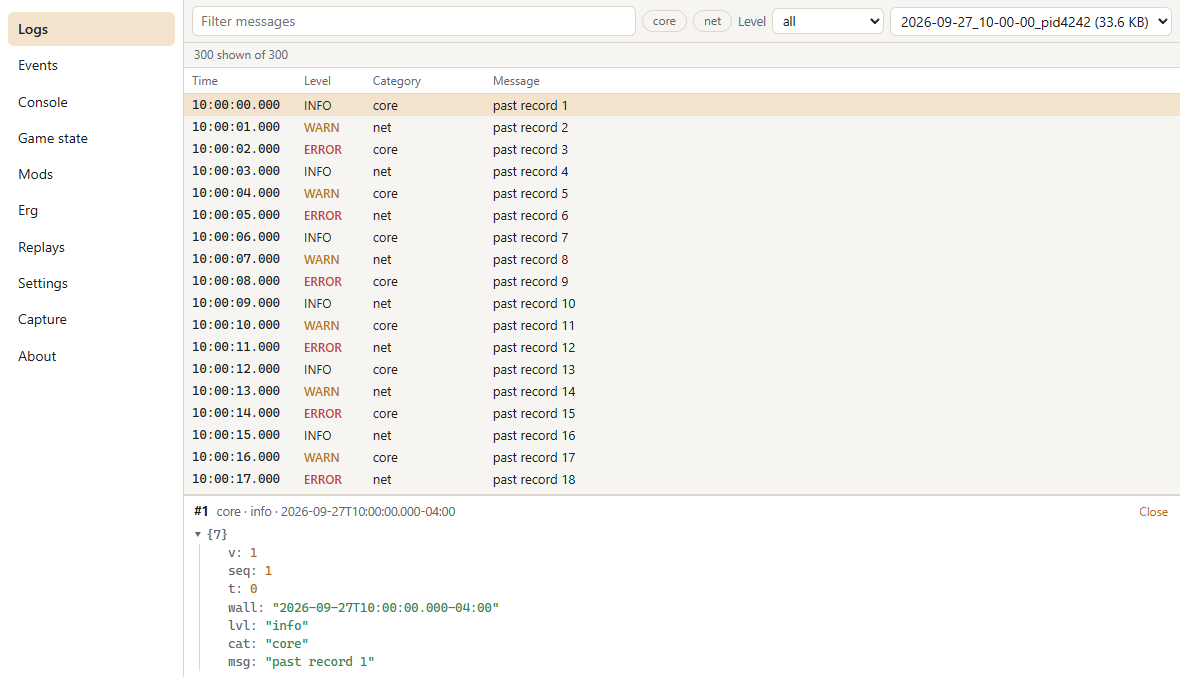
| Logs | The live log (the log stream) in a virtualised table of up to 50 000 records: filter by level, category and text, pause, follow the newest, open a record as a JSON tree. The source menu opens a past session’s events.jsonl. |
| Events | Pick bus messages by name or Prefix.* and watch them arrive with their decoded payloads. Nothing is streamed until you pick something. The Counts view shows every message’s rate from bus.counts. |
| Console | Lua, as the overlay console: the client environment, a mod’s environment or the match. Enter runs, Shift+Enter adds a line, Tab completes, Up and Down recall your history (kept in the browser). Match code follows the console’s rule: refused online unless [LuaConsole] MatchConsoleOnline=1. |
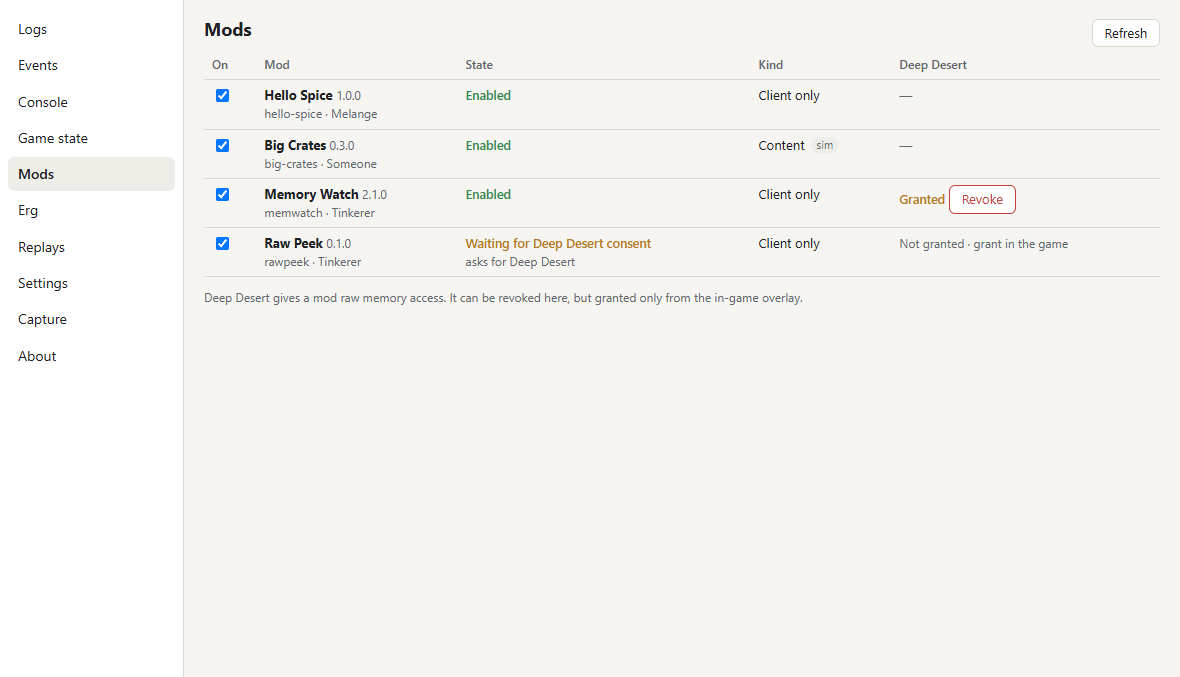
| Mods | Enable and disable mods (content mods take effect after a restart), see load errors, and revoke Deep Desert. Deep Desert is never granted from the browser: a mod waiting for consent asks in the game’s overlay. |
| Store | Browse the plugin store: search, categories, details with screenshots and changelogs, and install, update or remove with progress. The game does the downloading and checking; the page never contacts GitHub itself. Installs, updates and removes are refused in a lobby, a network game or a match. Needs the game. |
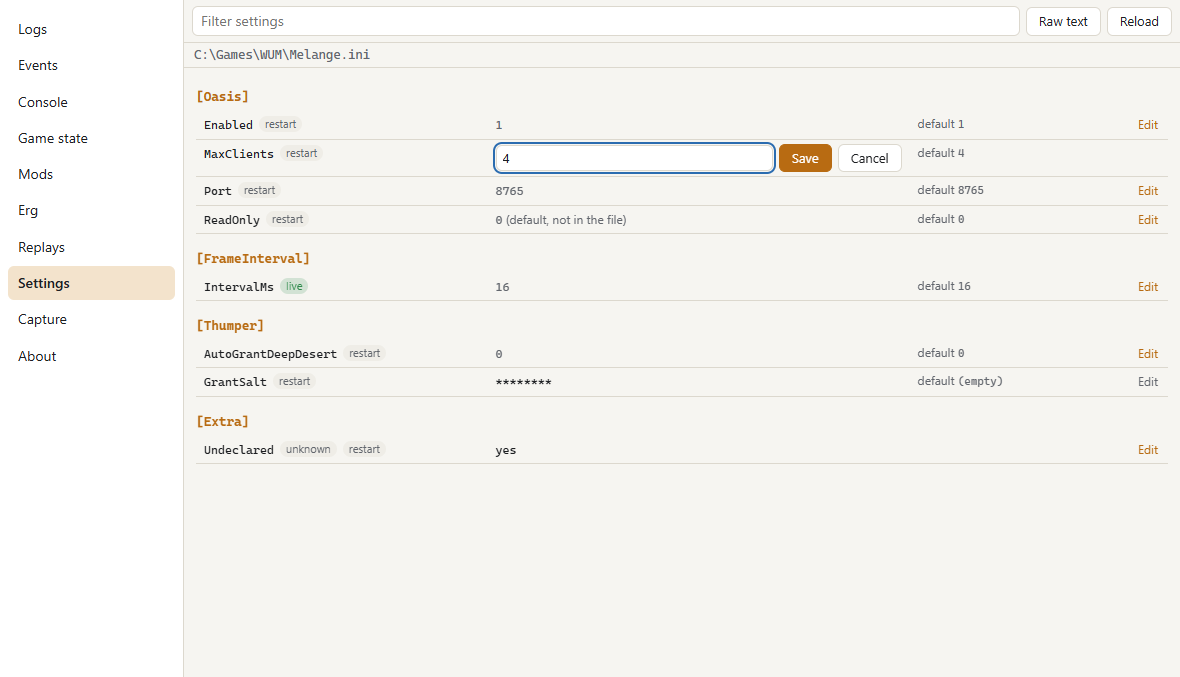
| Settings | Every Melange.ini key a module declares, with its default and whether it applies live or after a restart, plus the file as raw text. Saving changes that one line in place and keeps every comment and other byte. [Thumper] GrantSalt is hidden and cannot be changed, and [Thumper] AutoGrantDeepDesert can only be set to 0. This hides the salt from the Settings page; it is not a defense against RawInspect (below), which can already read it as part of the process. |
| Erg | The map editor: open a copy of a multiplayer level, move spawn knots and objects, place oil drums and mines, set water, theme and time of day, and save the project. Needs the level service; the 3D view (three.js) loads only when a project opens. |
| About | Versions, the protocol, and the channels and methods the server offers. |
Tabs can be opened side by side (the ⧉ button next to a tab, or the command palette, Ctrl+K). The layout and the
colour theme (system, light or dark) are remembered by the browser. With ReadOnly=1 every control that changes
something is disabled, the console included.
Settings ([Oasis] in Melange.ini)
Section titled “Settings ([Oasis] in Melange.ini)”| Key | Default | Meaning |
|---|---|---|
Enabled |
1 |
Load the Oasis module. With 0, nothing of Oasis runs. |
AutoStart |
0 |
Start the server when the game starts instead of on first open. |
Port, PortRange |
8765, 10 |
The first port to try and how many to try. |
MaxClients |
4 |
Browser tabs (WebSocket clients) at once. |
ReadOnly |
0 |
Refuse every call that changes something (ini, mods, captures). |
RawInspect |
1 |
Allow the read-only memory view in the entity inspector. Anyone with the session cookie can read any address the process can, including Melange’s own memory; set to 0 to turn it off. |
WebRoot |
(empty) | Serve the web app from this folder instead of the copy built into melange.asi (development; relative to the game folder). |
AutoOpen |
0 |
Also open a browser tab the moment the server starts (otherwise only the overlay button, hotkey and menu item open one). |
Hotkey |
Ctrl+Shift+O |
Opens Oasis (starts the server if needed and opens exactly one browser tab); also Oasis/Open in the overlay menu. |
Building the web app
Section titled “Building the web app”The web app lives in web/ (TypeScript and Preact) and is built into melange.asi as a zip. The toolchain is
portable and needs no npm:
.\scripts\web\fetch.ps1 # once: Node.js and esbuild into tools\, the packages of web\web.lock.json into web\node_modules.\build.ps1 # type-checks, bundles and embeds the web app.\scripts\web\test.ps1 # unit tests; add -Url <launch url> for the browser tests against a running game.\scripts\web\test.ps1 -Panels # plus every panel in headless Edge against a mock server (no game needed).\scripts\web\test.ps1 -Erg # plus the Erg map editor in headless Edge (WebGL by SwiftShader) on synthetic levelsweb/test/e2e/mock-server.mjs is a stand-in for the game’s server that serves a built app and fakes the streams and
methods; node web/test/e2e/mock-server.mjs --root web/dist prints a link you can open by hand.
web/toolchain.lock.jsonpins Node.js and esbuild by SHA-256.web/web.lock.jsonlists every package, transitive ones included, with its registry tarball,sha512integrity and licence.fetch.ps1downloads the tarballs straight from the registry, checks each against the lock, checks every licence against the allowlist (MIT, ISC, BSD-2-Clause, BSD-3-Clause, Apache-2.0, 0BSD), and unpacks them with the systemtar.exe. No package manager runs and no install script executes. It also writesTHIRD_PARTY.md.scripts/web/lock.mjs(undertools\node\node.exe) resolves new versions from the registry and rewritesweb.lock.json; updating a dependency is a reviewed diff of that file.- Without the toolchain, or with
-DMELANGE_WEB=OFF,melange.asiembeds a one-page placeholder instead. - The build is deterministic: the same sources and lock give the same bundle, and the bundle’s build id is a hash of its inputs.
Standalone: Melange.exe
Section titled “Standalone: Melange.exe”Melange.exe ships next to melange.asi and serves the same app and protocol with the game closed: past session
logs, captures, and the mods and settings of the game folder it sits in.
Melange.exe [--game <dir>] [--browser] [--serve] [--web-root <dir>]- It opens its own window (WebView2) on the game folder it was installed into, or
--game.--browseropens the page in the default browser instead, and--serveruns the server without a window. welcome.serveris"standalone";state,entitiesand the other game-only channels and methods are absent (a live panel that needs them shows “game not running”).- While a real Melange instance is running (detected by the same
Local\Melange-<hash>mutex the .asi holds),mods.setEnabledandini.setare refused with-32003: the running game owns those files. With the game closed,Melange.exewrites them itself (Mods\thumper-state.json,Melange.ini) the same way the overlay would. --web-root <dir>serves a folder instead of the embedded bundle (development);--no-openskips the browser (scripted or headless use).mods.listreads everyMods\<id>\spice.jsonand resolves them exactly as the game would (spice::Resolve); a Deep Desert mod already granted in-game still shows Enabled, but granting it is not possible from here (Decision 4: the browser can revoke Deep Desert but never grant it, and standalone has no consent dialog to show).
Web panels from modules and mods
Section titled “Web panels from modules and mods”A C++ module (melange::oasis::AddWebPanel) or a client mod (wum.web.panel, see lua-api.md) can add a page of
its own, served at /ext/<id>/ and embedded by the shell in <iframe sandbox="allow-scripts">. That frame has an
opaque origin: no cookie, and no same-origin fetch, so it cannot reach /ws or anything else in the app directly
(/ext/* therefore does not itself require the token or cookie either — the frame could never present them, and
its content is the same non-secret bundle already inside melange.asi; the same goes for the bridge script
/app/ext.js). Its own JSON API goes through that script and postMessage to the shell, which allows only the
panel’s own mod.<id>.* channels and methods
plus read-only state and log, and enforces that from the trusted side, not from inside the frame.
Writing a panel
Section titled “Writing a panel”Panels are TypeScript modules under web/src/panels/<name>/. Each registers itself and is loaded on first open:
import { registerPanel } from "../../sdk/panels";registerPanel({ id: "hello", title: "Hello", order: 50, needs: ["game"], load: () => import("./Hello") });import { render } from "preact";import type { Client } from "../../sdk/client";export function mount(el: HTMLElement, c: Client) { const off = c.subscribe<{ n: number }>("mod.hello.ticks", undefined, (m) => { el.textContent = `tick ${m.n}`; }); return () => { off(); render(null, el); };}A panel imports only from web/src/sdk/ and its own folder. sdk/ui has a virtualised table, a JSON tree, a filter
bar and a split pane.
Adding channels and methods from C++
Section titled “Adding channels and methods from C++”melange/oasis.h:
#include "melange/oasis.h"namespace oasis = melange::oasis;
oasis::ChannelId g_ticks = oasis::AddChannel("mod.hello.ticks");void OnFrame() {    if (oasis::HasSubscribers(g_ticks)) oasis::Publish(g_ticks, "{\"n\":42}");  // costs one atomic load when unwatched}
void Echo(const oasis::Call& c, oasis::Result& r, void*) { r.json = std::string(c.paramsJson); }oasis::AddMethod("hello.echo", &Echo, nullptr); // runs on the main thread, in the Frame eventPublishcopies the message into each subscriber’s queue and never blocks. Each client has a bounded queue per channel:DropOldestdrops from the front and tells the client how many it missed;Coalescekeeps only the latest.- Methods run on the main thread by default, at most 0.5 ms of them per frame;
kRpcServerThreadruns one on the server thread instead (it must not touch the game). A method that faults three times is disabled. kRpcMutatingmethods are refused whenReadOnly=1.
Protocol (version 1)
Section titled “Protocol (version 1)”HTTP/1.1 with keep-alive, GET and HEAD only. Requests have no body; Transfer-Encoding, folded header lines,
a duplicate Host, control characters and non-ASCII bytes in the target are refused with 400, more than 64
headers or 16 KB of them with 431 or 413.
| Route | Auth | Response |
|---|---|---|
GET /?k=<token> |
token | sets the session cookie, 303 / |
GET /, /app/* |
cookie (/app/ext.js: none) |
the app; ETag, Cache-Control: no-cache; .gz copies sent as-is to clients that accept gzip |
GET /ws (upgrade) |
cookie + Origin, or ?k= with no Origin |
WebSocket |
GET /captures/<name>.mcap * |
cookie | a capture file, Range supported |
GET /ext/<panel>/* * |
none (see below) | a module’s or mod’s web panel, sandboxed |
GET /logs/<session>/<file> * |
cookie | past session logs |
GET /erg/assets/<key>.glb|.png * |
cookie | an Erg preview (a detail’s mesh or a theme’s material atlas); key only from level.palette or level.load, ETag = the cache key, Cache-Control: private, max-age=86400 |
| anything else | - | 404 |
Routes marked * are added by the providers that serve them.
Every response carries Content-Security-Policy (default-src 'self', frame-ancestors 'none', …),
X-Content-Type-Options: nosniff and Referrer-Policy: no-referrer, and never any Access-Control-* header. The
session cookie is oasis_s_<port> (named per port, since 127.0.0.1 has no per-port cookie jar and two Oasis
processes would otherwise overwrite each other’s cookie), HttpOnly; SameSite=Strict; Path=/.
WebSocket
Section titled “WebSocket”RFC 6455 version 13. Client frames must be masked; no extensions; text messages must be valid UTF-8; fragmented messages are reassembled up to 1 MB; control frames are at most 125 bytes. The server pings after 20 s of silence and closes after 60 s without an answer.
Every message is one JSON object with a t member:
t |
Direction | Members |
|---|---|---|
hello |
client -> server | proto (1), build (the page’s build id), client |
welcome |
server -> client | proto, build, server (game or standalone), caps (feature set: ["launcher"] in Melange.exe), game (exeBuild, melange), channels, methods, panels, limits |
bye |
server -> client | reason, want: sent before a protocol refusal |
sub |
client -> server | ch, filter (object, optional), id (optional; acknowledged by res) |
unsub |
client -> server | ch, id (optional) |
ev |
server -> client | ch, seq, then d (one value) or b (a batch; the items have seq, seq+1, …) |
drop |
server -> client | ch, n (messages this client missed), why (queue or rate) |
call |
client -> server | id (integer chosen by the client), m (method), p (object, optional) |
res |
server -> client | id, r (the result) |
err |
server -> client | id (or null), code, msg, data (optional) |
The client sends hello first; anything else first closes the socket with 4002. seq counts every message a
client was due on a channel, dropped ones included, so a gap equals the n of the preceding drop. Batches are
flushed at most every 50 ms per channel. res and err are never dropped.
proto rises only for a breaking change to this envelope. New channels, methods and members are additive: readers
ignore members they do not know, and clients check welcome.channels and welcome.methods before using a feature.
A page whose build differs from the server’s reloads once.
Error codes: -32600 bad envelope, -32601 unknown method, -32602 bad parameters, -32000 refused by policy
(msg says why), -32001 not in a match or game not running, -32002 busy (at most 16 queued calls per client),
-32003 read-only, -32004 the handler faulted.
Close codes: 4000 closed by the game (the page reconnects), 4001 protocol version, 4002 no hello, 4003 auth, 4008 the client stopped reading, 4029 too many clients.
Core methods
Section titled “Core methods”| Method | Result |
|---|---|
sys.ping |
{frame, ms}: the game’s frame counter and the server’s clock |
bus.names |
[{id, name, posts, deliveries}]: every registered engine message name and its counts |
log.sessions |
[{id, files, bytes}]: the 20 most recent log sessions, newest first, the current one included; their files are served at /logs/<id>/<file> |
Launcher (Melange.exe only)
Section titled “Launcher (Melange.exe only)”These methods are available only when Melange.exe is running (the welcome message includes "caps": ["launcher"]). The launcher runs on its own threads; methods are tagged with their thread: M = main (UI thread), S = server, W = setup worker (I/O and hashing). ! = mutating (refused with ReadOnly=1). A new setup channel publishes status changes and progress during transactions.
| Method | Params → result | Notes |
|---|---|---|
launcher.state |
{} → LauncherState |
LauncherState: {version, firstRun, gameDir | null, theme: "system"|"light"|"dark", webview: bool, elevated: bool, protected: string[], resume?}; protected lists folders where writes are forbidden (test safety); resume is the setup.elevate action this elevated run should pick up. |
launcher.quit ! |
{} → {} |
Closes Melange.exe (the button on Restore vanilla’s last screen). Files Restore vanilla couldn’t delete because this process uses them (its own Melange.exe in the game folder) are deleted once it has exited. |
launcher.setTheme ! |
{theme: "system"|"light"|"dark"} → {} |
Saves to launcher.json and updates the window caption’s dark mode. |
launcher.launch |
{} → {how: "steam"|"exe"} |
Starts the game via steam://rungameid/70600 (Steam installs) or WormsMayhem.exe directly (GOG/other). |
launcher.openPath |
{what: "game"|"logs"|"backup"|"export"|"incompatible", id?, folder?} → {} |
Opens a folder in Explorer: the game folder, the Melange logs folder, a backup by id, or Mods\.incompatible (with folder, a sweep notice’s .incompatible\<name>). export shows the zip the last launcher.exportLogs wrote, selected. |
launcher.exportLogs |
{reveal?: bool} → {path, bytes, entries, onDesktop, sessionId | null, pid} |
Zips the last game’s logs (the newest session folder, the recordings and desync bundles its pid wrote, dumps and engine logs from its time window, launcher.log) to the Desktop, else Documents\Melange\exports, with the same redaction as the in-game export, then shows it selected in Explorer unless reveal is false. -32002 while another export runs. |
launcher.shortcuts ! |
{startMenu: bool, desktop: bool} → {} |
Creates Start menu and/or desktop shortcuts to Melange.exe in the game folder. |
setup.detect |
{} → {candidates: Candidate[]} |
Locates game folders (Steam, GOG, saved, or manually browsed). Each Candidate: {path, source: "saved"|"self"|"steam"|"gog"|"manual", library?, check: GameCheck}. GameCheck includes the exe’s size, SHA-256 hash (if readable), and verdict: "ok", "wrongBuild", "noExe", "notFound" or "unreadable". |
setup.browse |
{start?: string} → {path | null, hint?: "child", child?: string} |
Shows a folder picker (Windows native dialog, UI thread). hint: "child" when the user picked a parent folder. |
setup.validate |
{path} → GameCheck |
Checks a game folder: exe presence, size, timestamp, SHA-256, and build verdict. |
setup.select ! |
{path, save: bool} → SetupStatus |
Selects a game folder for this run (and saves it if save: true). Refused unless verdict is ok. |
setup.status |
{} → SetupStatus |
Game folder state: loader identity and version, Melange state and last-load time, duplicates, legacy files, backups. SetupStatus: {game: GameCheck | null, running, melangeLoaded, loader: {state: "none"|"ual"|"other", dll?: DllInfo}, otherLoaders: DllInfo[], melange: {state, version?, path?, duplicates: string[], lastLoad?: {at, version}}, ini: {present, missingKeys}, legacy: string[], payload: {ok, version, missing: string[], fromGameFolder}, backups: [{id, created, action, files: [{path, op, description?}]}], install?: {...}}. |
setup.plan |
{action: "install"|"repair"|"uninstall", replaceLoader?, allowDowngrade?, removeData?} → Plan |
Previews changes: the steps that would be taken, their reason, and any choice needed (e.g. which loader to replace). Plan: {planId, steps: [{op, path, detail}], needsChoice?: "loader", refused?: string}. |
setup.apply ! |
{action, ..., planId} → ApplyResult |
Executes the plan if unchanged. Reports progress on the setup channel. ApplyResult: {ok: true, backupId?, status: SetupStatus} on success, or an error code (-32010 needs elevation, -32012 rollback failure). |
setup.restore ! |
{backupId} → ApplyResult |
Restores a previous installation from a backup as a transaction. |
setup.deleteBackup ! |
{backupId} → {} |
Deletes a backup (no undo). |
setup.setMelangeEnabled ! |
{on: bool} → SetupStatus |
Disables Melange by renaming melange.asi ↔ melange.asi.off (the game runs vanilla). |
setup.vanillaPlan |
{} → VanillaPlan |
Restore vanilla’s preview: every file in the game folder not in the stock #1077 list (embedded in Melange.exe), minus game-written files (local.cfg, Default.cfg, steam_appid.txt, user.cfg, *.csh, XOM*-*.log, Net_*.log, Redist\). VanillaPlan: {planId, refused?, groups: [{id: "melange"|"renewation"|"wumpatch"|"loader"|"reshade"|"specialk"|"dgvoodoo"|"mousefix"|"asi"|"other", label, files}], files, bytes, sample: string[], replays: string[], replaysDir, modified: string[], modifiedCount, missing: string[], missingCount, overwrites, verify, store, selfInGame}. modified/missing: stock files whose size differs or that are gone; verify when there are any, or a framework that overwrites stock files (Renewation HD, WUMPatch) was found. Refused (with refused) like setup.plan: wrong build, game running, protected folder. |
setup.vanillaApply ! |
{planId} → VanillaResult |
Moves *.wsr and desync-*.zip to Documents\Melange\replays (never overwriting), then deletes the planned files permanently (no backup) and the non-stock folders left empty. Then launcher.json forgets the game folder, first run, default plugins and the last update check (theme, window and other preferences stay), staged updates are deleted, and with verify on a Steam install steam://validate/70600 is opened. VanillaResult: {ok, deleted, dirsRemoved, moved: [{from, to}], replaysDir, failed, modified, missing, verify, verifyStarted, store, selfPending}. Errors: -32013 plan changed, -32010 needs elevation (setup.elevate {resume: "vanilla"}), -32012 some files could not be deleted, -32002 busy. |
setup.elevate |
{resume: "install"|"repair"|"uninstall"|"restore:<id>"|"vanilla"} → {} (then exits) |
On Windows, elevates to administrator, re-runs the launcher with --game <dir> --resume <action>, and exits the current process. |
plugins.settings |
{id} → {decl: Setting[], values, defaults} |
Declaration and current values of a plugin’s settings. Setting: {key, type: "bool"|"int"|"float"|"string"|"enum", label, default, min?, max?, options?: string[], help?, optionLabels?: Record<string, {label, help?}>}. |
plugins.setSettings ! |
{id, values: Record<string, value>} → {values} |
Writes settings to Melange.ini [Mod.<id>], with validation. Errors: -32602 {key, why} for type/range/enum failures. |
plugins.resetSettings ! |
{id} → {values} |
Resets to the user’s default or the declared default. |
defaults.get |
{} → Defaults |
The user’s default set of plugins and their settings. Defaults: {plugins: [{id, enabled, settings: Record<string, value>}], seeded: bool}. |
defaults.set ! |
Defaults → Defaults |
Saves the user’s defaults. |
recommended.get |
{} → {source: "index"|"builtin", items: Recommended[]} |
The recommended plugins (from the store index, or a built-in fallback if offline). Recommended: {id, name, description, why, settings, installed, compatible, reason?, decl?: Setting[]}. |
recommended.apply ! |
{items: [{id, settings}], saveAsDefaults: bool} → {queued: string[]} |
Installs and enables the selected recommended plugins. Reports progress on the store channel. queued lists the plugin ids being downloaded. |
Channel setup: {status: SetupStatus} on every change (folder selection, game start/stop, file changes), and {progress: {action, step, of, label}} during a transaction (each step’s name, current step number, total steps).
Melange updating itself (developer guide):
| Method | Params → result | Notes |
|---|---|---|
update.status |
{} → UpdateStatus |
UpdateStatus: {current, phase: "idle"|"checking"|"downloading"|"ready"|"current"|"error", latest?, htmlUrl?, progress?: {got, total}, error?, lastCheck?, applied?: {ok, gameUpdated, version, message, at, warnings}, auto}. auto: Check for updates automatically (update.setAuto). ready: a newer release is downloaded and verified. error only follows a check you asked for; the automatic one at start fails silently. applied is what the last Restart to update did, reported once by the launcher that started after it. |
update.check |
{} → UpdateStatus |
Looks at GitHub’s latest release now, and downloads it in the background if it is newer (a no-op while a check runs). Works with automatic checks off. |
update.setAuto ! |
{on: bool} → UpdateStatus |
Turns automatic checks on or off: the launcher’s at start (autoUpdate in launcher.json) and the game’s daily one ([Update] CheckInGame in the game folder’s Melange.ini, written when it disagrees and the file exists; a running game reads it at its next start). On also checks now. Publishes on update. -32002 while another setup change runs. |
update.apply ! |
{} → {} (then exits) |
Starts the downloaded Melange.exe with --apply-update and closes this one. Refused (-32000) with nothing ready or while the game runs (“Close the game to update.”), -32002 while another setup change or an import runs. |
Channel update: {status: UpdateStatus} on every change, including download progress (at most 4 a second).
Settings › Display (developer guide):
| Method | Params → result | Notes |
|---|---|---|
display.get |
{} → DisplayState |
DisplayState: {monitor: {w, h}, modes: [{w, h}], windowed: {w, h} | null, source: "local"|"default"|"none", localCfg, exclusive, fullscreen, enabled, hotkey, melangeIni, running, refused?}. monitor: the primary monitor in pixels; modes: its display modes and the common 16:9 sizes no larger than it, largest first; windowed: the /W /H the game opens at (local.cfg over Default.cfg, source says which); exclusive: /FS is in local.cfg; fullscreen, enabled, hotkey: [Display] in Melange.ini; refused: why display.set would be refused now (the game runs, no folder). |
display.set ! |
{fullscreen: bool, width, height} → DisplayState (+ removedFs: true) |
Writes /W /H into local.cfg (everything else in it kept; created when missing) and [Display] Fullscreen into Melange.ini (and Enabled=1 when turning it on). Turning fullscreen on removes /FS from local.cfg, and the result says so with removedFs. Refused (-32000) while the game runs, and for fullscreen without a Melange.ini; -32602 for a size under 640x480 or not whole pixels; -32002 while another setup change runs. |
Console, mods and settings
Section titled “Console, mods and settings”| Method | Params → result | Notes |
|---|---|---|
lua.eval |
{target: "client"|"match"|"mod", mod?, code} → {ok, text} |
Main thread, one per frame across clients; code at most 64 KB; =expr is shorthand for return expr. A Lua error is ok:false with the message. match outside a match is -32001, and refused online (-32000, the console’s reason) unless [LuaConsole] MatchConsoleOnline=1. Refused with ReadOnly=1. |
lua.complete |
{target, mod?, prefix} → [string] |
The names that can follow the last . or : of prefix. |
mods.list |
{} → [ModInfo] |
ModInfo: {id, name, version, authors, dir, kind: "client"|"content", state, reason, on, restartRequired, implicitManifest, hasClient, hasSim, deepDesert: {declared, granted}, order, source: "store"|"local", sandbox?: {loaded, error, callbacks, disabledCallbacks, faults, bytes}}. state is enabled, disabled, blocked, pending-consent, incompatible or restart-required (Melange.exe uses the same names). source is store for a plugin with a record in Mods\.store\installed.json or a map pack a Store importer made. Melange.exe also lists a folder whose spice.json does not parse, as incompatible. |
mods.setEnabled |
{id, on} → ModInfo |
As the overlay’s checkbox: persisted; client-only mods apply at once, content mods at the next launch. Enabling a Deep Desert mod does not grant it: the consent prompt appears in the game. |
mods.revokeDeepDesert |
{id} → ModInfo |
There is no method to grant Deep Desert. |
mods.view |
{} → {showLocal, notices: [Notice]} |
What the Mods pages show beside the list: whether local plugins are listed (thumper-state.json showLocal, off by default) and the compatibility sweep’s notices, oldest first. Notice: {key, id, name, version, action: "quarantined"|"removed"|"updated"|"failed", reason, melange, at, folder, detail, text} (folder is .incompatible\<name> for a quarantined plugin; text is the line to show). Also in Melange.exe. |
mods.setShowLocal |
{on} → mods.view result |
Display only: a hidden local plugin keeps its switch and still loads. Melange.exe refuses it while the game runs. |
mods.dismissNotice |
{key?} → mods.view result |
Without key, every notice. Also in Melange.exe. |
ini.get |
{} → {path, encoding, text, keys} |
keys: [{section, key, def, live, declared, current, line?}], every declared key plus the undeclared ones in the file; def is null for undeclared keys and current is null for keys missing from the file. The grant salt reads ********. |
ini.set |
{section, key, value} → {live, restart, changed} |
One line is changed in place (indentation, spacing, key spelling and an inline ; comment kept) or added after the section’s last key, and the file is replaced atomically in its own encoding. The key must be declared, present in the file, or in a [Mod.<id>] section. Values cannot contain line breaks or ; or start or end with a space. [Thumper] GrantSalt, and [Thumper] AutoGrantDeepDesert other than 0, are refused (-32000). |
The mods channel sends the whole mods.list result to a new subscriber and again on every change (Coalesce).
The plugin store’s methods are game-only. Each mutating method returns at once and the work runs on the Store’s own
thread, reporting on the store channel; the mods channel reports what changed in Mods\ afterwards. Install,
update and remove are refused (-32000, with the reason) in a lobby, a network game, a match, while a level loads or
an Erg Test runs, and with -32002 while another one is running. Mutating methods are refused with -32003 under
ReadOnly=1.
| Method | Params → result | Notes |
|---|---|---|
store.status |
{} → Status |
Status: {enabled, indexUrl, customIndex, fetchedAt, offline, serial, plugins, job: {phase, id, version, bytes, total, message}, gate, fetching, haveIndex, rollback, busy, error, pending, notices}. gate is "" or why changes are refused right now. |
store.refresh |
{} → {started} |
Fetches the list (a no-op while a fetch runs). The panel calls it when it opens; nothing is fetched before that. |
store.list |
{query?, category?, filter?: "all"|"installed"|"updates", incompatible?} → [Item] |
Item: {id, name, authors, description, categories, kind: "client-only"|"content", unsafe, licence, latest, compatible, size, installed: {version, managed, state, enabled} | null, action: "install"|"update"|"remove"|"none", canRemove, state, reason, error}. Updates first, then by name. |
store.details |
{id} → Item + {homepage, permissions: {unsafe, filesystem}, content, dependencies, conflicts, screenshots: [{n, caption, ready}], versions: [{version, released, melange, size, changelog, yanked, compatible}], dependants, conflictsEnabled, plan: [{id, version}], planError} |
Starts fetching the plugin’s screenshots; each one arrives as a store event. |
store.install |
{id, version?, enable?: true, replaceManual?: false} → {started} |
Dependencies in plan are installed first. A copy of the mod put in Mods\ by hand is replaced only with replaceManual. |
store.update |
{id} → {started} |
Store-installed plugins only. |
store.remove |
{id, deleteData?: false} → {started} |
deleteData also removes [Mod.<id>] from Melange.ini and the mod’s saved data. |
store.cancel |
{} → {cancelled} |
Download phase only. |
store.openHomepage |
{id} → {} |
Opens the listing’s https:// homepage in the default browser on the game’s PC. |
The store channel (Coalesce) sends {phase, id, version, bytes, total, message, pending, fetching, busy, gate, serial, shots, shot?}; phase is idle, fetching, downloading, verifying, installing, removing, done or
error. GET /store/shots/<id>/<n> serves a screenshot the game has already fetched and verified (404 before
that), with the same cookie as the app.
Local content importers
Section titled “Local content importers”Plugins can declare a recipe to import content (such as maps) from a download or local file on the player’s machine. Every importer is driven through these RPC methods. See importers.md for the recipe schema and safety model.
| Method | Params → result | Notes |
|---|---|---|
import.list |
{} → {importers: Importer[]} |
Every installed plugin with a valid recipe |
import.status |
{plugin} → Importer |
Status of one importer |
import.browse |
{plugin} → {path, name, size} or {cancelled: true} |
Native file picker for .zip files |
import.start |
{plugin, source: {kind: "download", id} | {kind: "file", path}, keepZip: bool, accepted: true} → {started: true} |
Start an import; progress on the import channel. accepted: true confirms the disclosure. File paths come only from import.browse. |
import.cancel |
{plugin} → {cancelling: bool} |
Stop the current job |
import.maps |
{plugin} → {maps: Map[], packs: Pack[]} |
Maps and packs from the current import, filtered and categorized per the recipe |
import.setHidden |
{plugin, files: string[], hidden: bool} → {hidden: number} |
Show or hide maps by file name |
import.setPacks |
{plugin, packs: [{id, enabled}]} → {packs: Pack[]} |
Enable or disable packs (changes online matching) |
import.uninstall |
{plugin, deleteZip?: bool} → {removed: string[]} |
Remove all imported packs |
import.deleteZip |
{plugin} → {freed: bytes} |
Delete the cached download |
The import channel (Coalesce) publishes {importers: [Importer]} on subscribe and {job: Job} on every phase change and at most every 200 ms during transfer/building; see importers.md for the Job shape.
The streams (log, bus, state, …) and the other methods are listed in welcome as their providers load.
Streams (log, bus, net, lobby, stats)
Section titled “Streams (log, bus, net, lobby, stats)”| Channel | Payload (d/b) |
Filter | Overflow |
|---|---|---|---|
log |
{seq, lvl, cat, ts, j} (j: the raw jlog line); backlog of the last 500 matching records on subscribe |
minLevel, cats (list), text (substring, matched against the raw line) |
DropOldest + drop |
net |
as log, restricted to the net and handshake categories |
as log |
DropOldest + drop |
bus |
{seq, frame, name, cls, path, handle, d?} (d: bus::Decode’s fields, when the filter asks for it and a decoder exists) |
names (required: exact name or Prefix.*), path ("post"; only Post is hooked), decode |
DropOldest + drop |
bus.counts |
{name: delta} for every name whose post+deliver count changed, once a second |
- | Coalesce |
lobby |
{inLobby, local: {hash, contentMods, modMessages, vanilla}, peers: [{steamId, name, status, hash16, version}]}, on change and at least once a second |
- | Coalesce |
stats |
oasis::GetStats() plus render::GetTiming() (busyMsP50, busyMsP95, fps, frames), once a second |
- | Coalesce |
The bus channel’s hook is installed only while at least one client subscribes to it, and only messages named by
some subscriber’s filter reach it at all (Camera.HasUpdated included). bus.counts reads the bus module’s own
always-on counters, so it costs nothing extra to keep the hook installed or not.
Game state
Section titled “Game state”The Game state panel shows the worms and teams of the current match (the active worm and team highlighted), the
live entities by kind (worms, projectiles with their weapon, crates, barrels, everything else by class name), a
top-down or side map of their positions, the game’s data variables, and an inspector with the known fields of an
entity and a read-only hex view of its memory. Everything is read on the game’s main thread, at most at the rate a
client asks for; nothing is ever written. The readers need build #1077 and [GameState] Enabled=1; otherwise the
state channel says available: false and the methods answer -32001.
| Channel | Payload | Filter | Overflow |
|---|---|---|---|
state |
a snapshot: {available, frame, matchSerial, match, teams, worms} |
hz 1-10 (default 5) |
Coalesce |
entities |
[{handle, object, vtable, kind, type, label, pos, vel}]; [] outside a match |
hz 1-5 (default 2), kinds |
Coalesce |
match:{inMatch, attract, online, currentTeam, activeWorm, turnMs, turnMsLeft, roundMs, roundMsLeft, windSpeed, windDir, waterLevel, turnsStarted, suddenDeath, theme}(times in ms,-1for no team or worm, wind direction in radians).turnsStartedandsuddenDeathcome from the engine’s message counters for this match.attractis true while the menu’s attract demo runs, whose match also reportsinMatch.teams[]:{slot, name, active, ai, local, colour, alliance, roundsWon, score}.worms[]:{slot, team, posInTeam, name, active, alive, health, physicsState, weapon, pos, vel}; positions are world units with +Y up,velis the engine’s raw value in world units per millisecond of game time (Lua’swum.game.worms()gives it per second),weaponis-1for none.- Outside a match
teamsandwormsare empty.kindis one ofWorm,Projectile,Crate,Barrel,Other;posandvelare{x, y, z}ornullwhen the class’s position is not known.
| Method | Params → result | Notes |
|---|---|---|
state.get |
{} → a snapshot |
the same snapshot as wum.game.worms() in the same frame |
state.vars |
{prefix?} → [{name, type, value}] |
every data variable (about two thousand), value as JSON; containers as {addr, class}; one call per second per client (-32002) |
entities.list |
{kinds?} → the entities payload |
-32001 outside a match |
entity.inspect |
{handle, len?} or {addr, len?} → {addr, len, vtable, type, kind?, handle?, fields, hex} |
len 1-4096 (default 256); hex has two characters per byte, ?? where memory is not readable; {addr} and hex need [Oasis] RawInspect=1 (-32000 / null otherwise) |
The raw view reads committed, readable pages only (never a guard page) and copies under a fault guard.
Erg (the map editor)
Section titled “Erg (the map editor)”See erg.md for the panel; this is the wire surface it and xomtool level use. level.export,
level.test and level.build write into Mods\ or the offline Test workspace and are refused (-32003) in
Melange.exe while a real Melange instance is running, as mods.setEnabled is. level.test also needs the game
running, at the frontend and outside a lobby (-32001 / -32000 otherwise), so it does not exist in Melange.exe
at all.
| Method | Params → result | Notes |
|---|---|---|
level.list |
{} → {bases: [{key, stem, title, source, theme}], projects: [{id, title, stem, base, modified, built}]} |
every vanilla Level_Type 0 map plus every enabled pack’s, and your own projects |
level.new |
{base, slug, title} → a project |
an empty patch against base |
level.load |
{project} or {base, surround?} → an erg-scene/1 or /2 result, then one bin frame per blob (surround: true adds the base’s .hmp as an hmp blob) |
see web/src/sdk/erg/scene.ts for the shape |
level.save |
{project, patch} → {saved, warnings} |
validates the whole patch (erg-patch/1 or /2) against its pinned base |
level.export |
{project, modId, name, version, mode: "install"|"source", survivor?: bool} → {dir, files, restartRequired} |
see erg.md; survivor (default false) adds a Survivor copy |
level.build |
{modId} → files written |
rebuilds a Source-form pack’s map files against this install (what its build.ps1 also does) |
level.test |
{project, tod?} → {key, state} |
builds into the Test workspace, arms a one-shot override, starts Quick Game itself when the game supports it; tod is DAY, EVENING or NIGHT for this Test only |
levels.live |
{modId, on} → {ok, reason} |
enables or disables a maps-only pack without a restart: game only, at the main menu, offline (see erg.md) |
level.themes |
{} → themes, times of day, material files |
from the install’s own Data\Themes |
level.palette |
{theme} → placeable entries {name, resource, role, preview} |
preview is an /erg/assets/ key |
level.objects |
{} → {crateKinds, weapons, utilities, limits, error} |
crate contents from the install’s Data\Tweak\WEAPTWK.XOM; error is null when it was read |
level.materials |
{file, base?, source?} → {file, names} |
the record names of a level material file (Databank.MaterialFile), at most 64, for second-material paint; a pack base’s own Maps\<stem>.txt is read from the pack |
level.close |
{project} → {} |
frees the server’s parsed copy of the base |
level.script.get |
{project} → {text} |
the project’s script.lua, "" when it has none |
level.script.put |
{project, text} → {saved, problems: [{line, message}], syntaxChecked} |
a level script’s rules (≤ 256 KB, UTF-8, no BOM or ESC); "" removes it; not saved when these fail. In the game the script is also compiled (not run) by the engine’s Lua 5.0: a syntax error is saved and listed in problems. Melange.exe checks the bytes only (syntaxChecked: false); the syntax is checked when the level is tested in the game |
The erg channel (Coalesce) carries {state, key, detail} from level.test’s progress (idle, registering,
registered, armed, starting, playing, ended, failed) and, at the start of a match, {level, water}.