
Sieve (xomtool)
xomtool reads and writes the game’s MOIK/TYPE/STRS/CTNR container format (“XOM”: weapon
data, bundles, panel textures, meshes). It ships two builds with the same behaviour:
- C++,
dist\tools\xomtool.exe(built bybuild.ps1), backed bysrc/xom(a small, portable library: no OS calls, builds for Win32, Linux and WebAssembly). - Python,
tools\xom\xomtool.py(stdlib only), for scripting without a compiler.
Both read and write the same melange-xom/1 JSON model (tools/xom/xom.py’s to_json/load):
unpack, bank, and every glTF conversion give byte-identical output between the two builds.
The one exception is a PNG file written by convert ... --out texture.png: the C++ build uses
stb_image_write and the Python build a small hand-rolled encoder, and their compressed bytes
differ even though the decoded pixels are always identical (tools/xom/parity_test.py checks
this the right way: pixel comparison for PNG output, byte comparison for everything else,
including the glTF JSON and binary buffer, since those come from this tool’s own deterministic
layout code and not a third-party codec).
Subcommands
Section titled “Subcommands”xomtool unpack <in.xom|.xan> [-o <out.json>] [--split <dir>]xomtool pack <in.json|dir> <out.xom>xomtool inspect <in.xom> [--object <NAME|#N>] [--type <TypeName>]xomtool diff <a.xom> <b.xom>xomtool convert <texture.png> --into <file.xom> --as <Name> [--section N] [--mips=0|1] [-o <out.xom>]xomtool convert <Name> --from <file.xom> --out <texture.png> [--mip N]xomtool convert <mesh.gltf|.glb> --into <file.xom> --as <Name> [--section N] [--material-from <Name>] [--material-file <file.xom>] [--texture <png>] [-o <out.xom>]xomtool convert <Name> --from <file.xom> --out <mesh.gltf>xomtool bank --from <src.xom> --object <BaseName> --as <NewName> [--set Field=value ...] --out <out.xom>xomtool report <in.xom> -o <out.md>Exit codes: 0 ok, 1 usage, 2 input error, 3 write refused. Every error names the object
(index or resource name) and the field it was about, where one is involved.
unpack / pack
Section titled “unpack / pack”unpack decodes a .xom/.xan file to the JSON model described in tools/xom/xom.py’s module
docstring: object references as {"ref": n}, byte arrays as {"hex": "..."}, a non-finite float
as {"f32": "<hex bits>"} or {"f64": "..."}, and everything else as plain JSON. pack is the
exact inverse and refuses (exit 3) if the objects it is given cannot be grouped into TYPE-table
order, or a field the schema expects is missing.
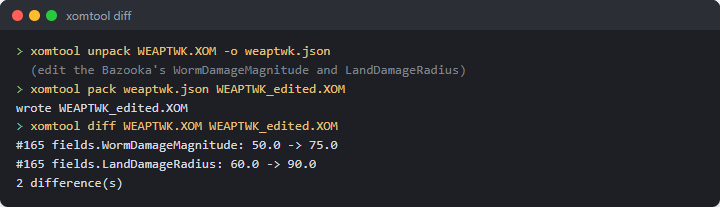
xomtool unpack Data/Tweak/WEAPTWK.XOM -o weaptwk.json# edit weaptwk.json ...xomtool pack weaptwk.json weaptwk_edited.xomunpack --split <dir> writes <dir>/index.json (the header, TYPE table, string table and an
objects array of {"type", "file"} pointers) plus one <dir>/objects/NNNNNN.json per object,
numbered by position - handy for putting a large file under version control one object at a time.
This is simpler than “one file per named resource” (not every object has a name, and the split
form is fully reversible either way): pack <dir> <out.xom> reassembles it exactly.
inspect and diff
Section titled “inspect and diff”inspect <file> alone lists the TYPE table and the root/string/object counts. --type X or
--object NAME/--object #N (1-based) narrows to matching objects and, given --object, prints
every field. diff a.xom b.xom compares them object by object (by position) and prints one line
per changed, added or removed field, labelled by the object’s ResourceId or Name when it has
one:
$ xomtool diff WEAPTWK.XOM WEAPTWK_edited.XOM#112 kWeaponBazooka fields.WormDamageMagnitude: 50.0 -> 75.01 difference(s)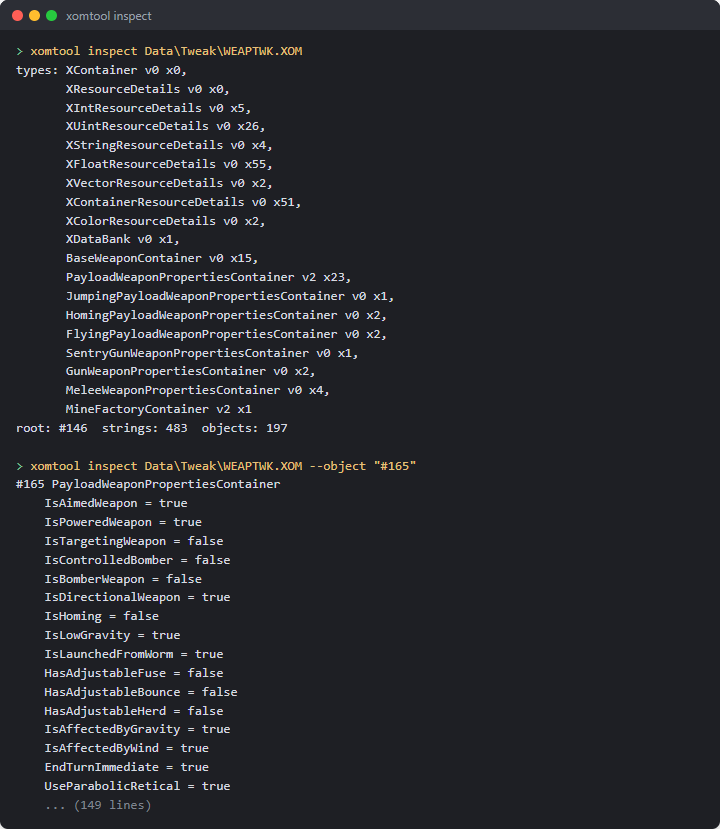
convert (textures)
Section titled “convert (textures)”xomtool convert weapon.png --into weapons.xom --as MyIcon.tgaxomtool convert MyIcon.tga --from weapons.xom --out weapon.png [--mip 0]Texture layout (validated against all 3110 shipped XImages):
Format 0 is RGB8, Format 1 is RGBA8, mip levels are back-to-back with no padding, and rows are
stored bottom-up (confirmed in game on the weapon panel atlas) while a PNG is top-down, so every conversion flips rows; channel order (RGB) is kept as-is
either way. --into appends a new, fully independent XImage (mips regenerated with a 2×2 box
filter unless --mips=0, in which case only the given level is stored - the lossless leg of the
round trip: PNG → XImage → PNG at level 0 is exact). --from/--out finds an existing XImage
by its Name field and extracts one mip level (default 0) to PNG.
convert (static meshes)
Section titled “convert (static meshes)”xomtool convert model.gltf --into weapons.xom --as MyMod.Payload \ --material-from Bazooka.Payload --material-file Data/Bundles/Bundl09.xom \ --texture mytexture.pngxomtool convert MyMod.Payload --from weapons.xom --out model.gltfMaps the object graph 1:1 onto glTF:
XMeshDescriptor -> XGraphSet -> XInteriorNode -> XGroup -> XShape -> XIndexedTriangleSet {XCoord3fSet, XNormal3fSet, XTexCoord2fSet, XIndexSet}- One primitive per
XShape.--from/--outwalks the mesh’s"world"graph entry (or its first entry, if none is named"world") and turns everyXShapeit finds into one glTF mesh and node, with that node’smatrixset from theXGroupchain above it (XTransform’s own cachedMatrixfield is used directly - see the note below - so no Euler-angle math is needed for this direction). - Indices are u16 only: a primitive with more than 65535 vertices is refused (exit 3).
--material-from <Name>deep-copies that resource’sXShape.Shadersubgraph (the shader, its texture stage(s), material and lighting objects) from--material-file(or--into’s own file, if--material-fileis omitted) into the output, unchanged, and every newXShapeuses the copy.--texture <png>additionally replaces the pixels of the oneXImagereachable through the copied shader’sTextureStages[*].Texture(refused if there is not exactly one - the well-defined case a template mesh’s shader actually has, not a general material editor). Without--material-from, new shapes get no shader (Shaderref 0).- Node transforms:
--intowrites the node’s matrix into a newXTransform’sMatrixfield exactly (this is what the engine renders from). ItsTranslate/Scalefields are derived from that same matrix;Rotateis written as(0,0,0)rather than decomposed, since nothing here reads it back - if your own tooling depends onRotate/RotateOrderbeing accurate for a mesh built byxomtool, decomposeMatrixyourself. - Deliberate limitation:
--intoonly appends a new, self-contained run of objects and new TYPE-table entries; it refuses (exit 3, naming the class) if the target file already defines any class the new mesh needs (XShape,XGroup,XTransform, …). Build one small, purpose-built output file per mesh (as the examples above do) rather than injecting into an existing bundle with meshes of its own already - doing that safely needs re-indexing everyReffield in the file, which is future work, not this version’s scope. - Not loadable in game yet:
LoadBankonly accepts anXDataBank(a typed list of scalar/vector/container resources - it has no mesh list), so a mod cannot currently point a weapon at a bank-built mesh;PayloadGraphicsResourceIDetc. may only name a vanilla mesh already in the scene. This converter still ships so the format and the authoring pipeline are ready for whichever loader path lands next; round-trip correctness (tests/xom_convert_selftest.cpp,parity_test.py) does not depend on that loader existing. - Skinned meshes, animation and a Blender addon are not in this version.
xomtool bank --from Data/Tweak/WEAPTWK.XOM --object kWeaponBazooka --as kWeaponMegaBazooka \ --set WormDamageMagnitude=120 --set PayloadGraphicsResourceID=Cow.Payload --out megabazooka.xomBuilds a minimal, one-entry XDataBank (XContainerResourceDetails + XDataBank + a copy of
the named container, with any --set overrides applied) from a container already present in
--from, matching what melange::weapons::registry’s bank manifest field loads
(see weapons.md). --set Field=value writes a bool/int/float/string field by name
(refused, exit 2, if the field does not exist or is a type --set cannot write, such as a ref
or an array); the field’s own type decides how value is parsed.
xomtool level unpack <in.xan> [--xom <level.xom>] [--hmp <in.hmp>] -o <scene.json> [--blobs <dir>]xomtool level build --patch <patch.ergpatch.json> --game <dir> --out <dir>xomtool level diff <a.json> <b.json>The C++-only counterpart to Erg’s own scene model (src/erg/scene.h, patch.h): unpack reads a base map’s
.xan (plus its level .XOM and .hmp when given) into the same erg-scene/1 JSON erg.md works with,
with voxel and height-map blobs as separate files next to it; build applies an erg-patch/1 file to its pinned
base and writes the map files a pack needs under --out (this is exactly what an exported Source-form pack’s
build.ps1 runs); diff prints the field-by-field differences between two scene JSON files. There is no Python
build of level — src/erg (not tools/xom) is the reference implementation, since it also has to run inside
the game and Melange.exe.
report
Section titled “report”xomtool report <file.xom> -o <out.md> writes a short Markdown table of an XDataBank’s named
resources (name, class, field count), or a plain type/count listing for any other file - the
generalised form of tools/xom/weapons_report.py (which stays as the detailed, hand-annotated
WEAPTWK.XOM report checked into the repo).
The JSON model
Section titled “The JSON model”See tools/xom/xom.py’s module docstring for the full field-by-field description
(format: "melange-xom/1"); src/xom/json.{h,cpp} is the C++ mirror, checked byte-for-byte
against it for the whole shipped asset set (tools/xom/parity_test.py, 943/943 files) and for the
unpack/pack/bank/convert fixtures above.
Self-tests
Section titled “Self-tests”- Offline, no game needed:
tests/xom_convert_selftest.cpp(built bybuild.ps1asxom_convert_selftest.exe, part ofscripts\selftest.ps1) runs read-only against an installed game copy when given--game <dir>(skipping, not failing, without one): the panel icon’s PNG and lossless round trips,Factory.Proj.Bazookashell’s glTF and XOM round trips, and the bank builder against akWeaponMegaBazookafixture.src/xom/xom_roundtrip.cpp(existing, unchanged by this component) keeps checking the underlying binary format itself, 943/943 files. - Parity, needs an installed game copy:
tools\xom\parity_test.py --game <dir> --xomtool <path to xomtool.exe> --bundles --mapsruns both builds over the same 943 files plus thebank/convertfixtures and compares outputs (see the note on PNG bytes above).
Limitations
Section titled “Limitations”unpack --splitwrites one file per object (numbered by position), not one file per named resource - not every object has a name, and per-object is simpler while staying fully reversible.convert’s texture-injection form (--into/--as) always appends a brand newXImage; it has no in-place “replace an existing texture by name” mode (that need is covered by--material-from/--textureon the mesh side, and by editingunpack’s JSON directly andpacking it back for anything else).convert’s mesh-injection form never rewrites an existing TYPE-table run (see above); it is a refusal, not a silent partial write.